Submission Process
Last updated: July 9, 2026
Once your SOV data is on Archipelago, you can streamline submission by giving the market access to your SOV.
Go To Market Video
What we provide to share with Underwriters:
The Archipelago SOV is available for download to you and the markets you share with. No need for an additional attachment.
Model-ready location files are also available for download and are always automatically aligned with the latest data in your SOV.
To prepare for submission:
Finalize your SOV updates prior to submission
Upload any marketing materials for underwriters (i.e., policy documents, loss runs, etc.) to the library. See how to manage your submission documents here.
(a) Recommended naming convention: 2024-Submission-XXXXX-XX-XX
(b) Check "market visible" and deselect any previous snapshots you don't want visible for underwriters
How to share with Underwriters:
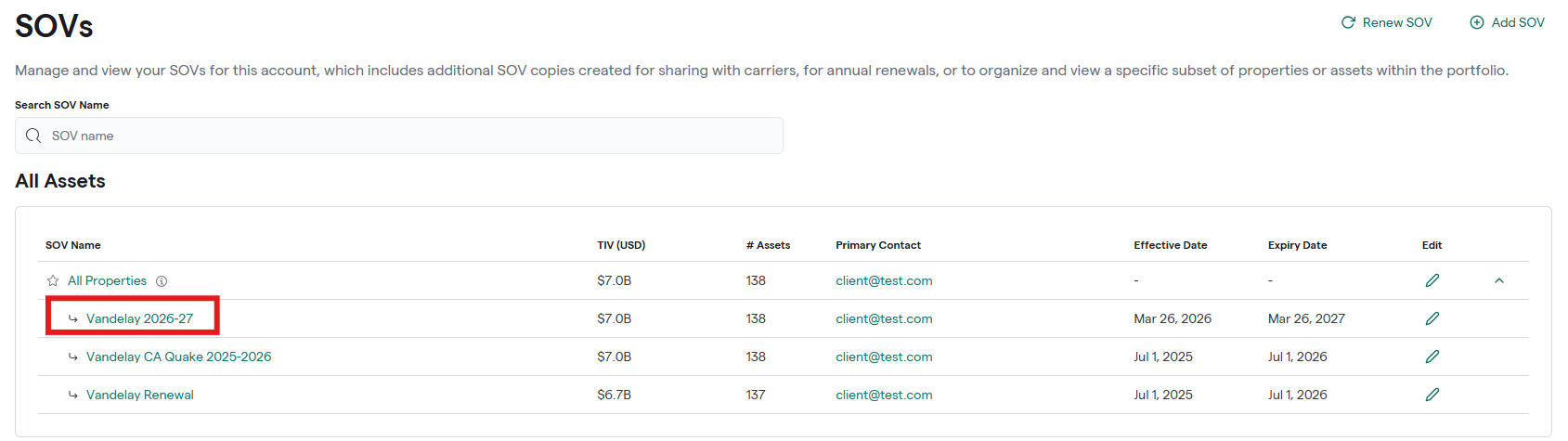
Open the SOV view you will be sharing (not All Properties), click Share in the top right corner
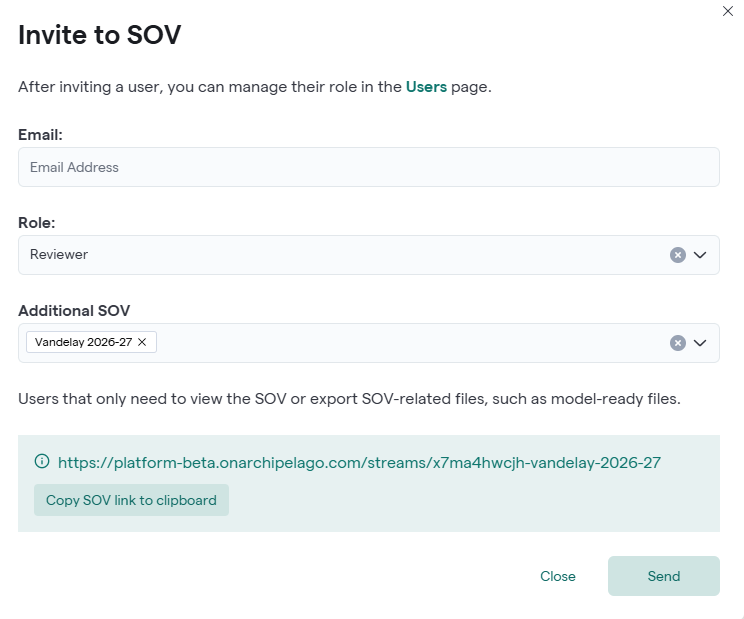
Enter the user's email address in the Email field and select Reviewer as the role
Click Send to invite the user, or copy the SOV link at the bottom of the modal to share directly
Underwriter domains are automatically whitelisted, so they can view (not edit)
If the domain isn't whitelisted or the underwriter has any issues accessing it, they can request access through Archipelago support (support@onarchipelago.com)
4. You can see "reviewers" who have accessed your SOV via the Users Page